Put any video
on the dome.
Outpaint expands flat footage into a full 180° fisheye dome, generating the entire hemisphere around your frame, so any clip becomes an immersive fulldome master. No reshoot, and every pixel you shot stays pixel-perfect.
What is fulldome video?
Fulldome video is footage mastered for a hemispherical dome screen. The image wraps overhead and fills the viewer’s whole field of view instead of sitting on a flat rectangle in front of them. It is the native format of planetariums, science centers, and immersive dome theaters, and it is almost always delivered as a circular 180° fisheye frame.
Most footage was never shot for a dome. Drop a widescreen clip onto one and it either floats in a small window surrounded by black, or it gets cropped to a sliver. Neither feels immersive.
Outpainting fixes that by growing the frame, not cropping it. Outpaint generates the entire hemisphere of new, matching footage around your original shot, so the scene extends continuously to the horizon of the dome. It is a flat-to-dome master that reads as if the whole thing were filmed with a fisheye lens, while every pixel you actually shot stays exactly where it was.
Aimed at the sweet spot.
On a dome, the audience reclines and looks up and forward, not straight overhead. That comfortable sightline, low toward the front of the dome, is the sweet spot, and it is where the action needs to sit.
So we do not just drop your footage in the middle. Outpaint anchors your original content down in the sweet spot and generates the hemisphere up and around it, so the main subject stays in the viewer’s natural sightline while the surroundings fill the dome overhead.
Nobody has to crane their neck, and the footage you shot stays exactly where the audience is already looking.
Flat footage,
expanded to the dome.
Real films remastered by Outpaint into full 180° fisheye domes. Nothing cropped, the whole hemisphere generated around the original.
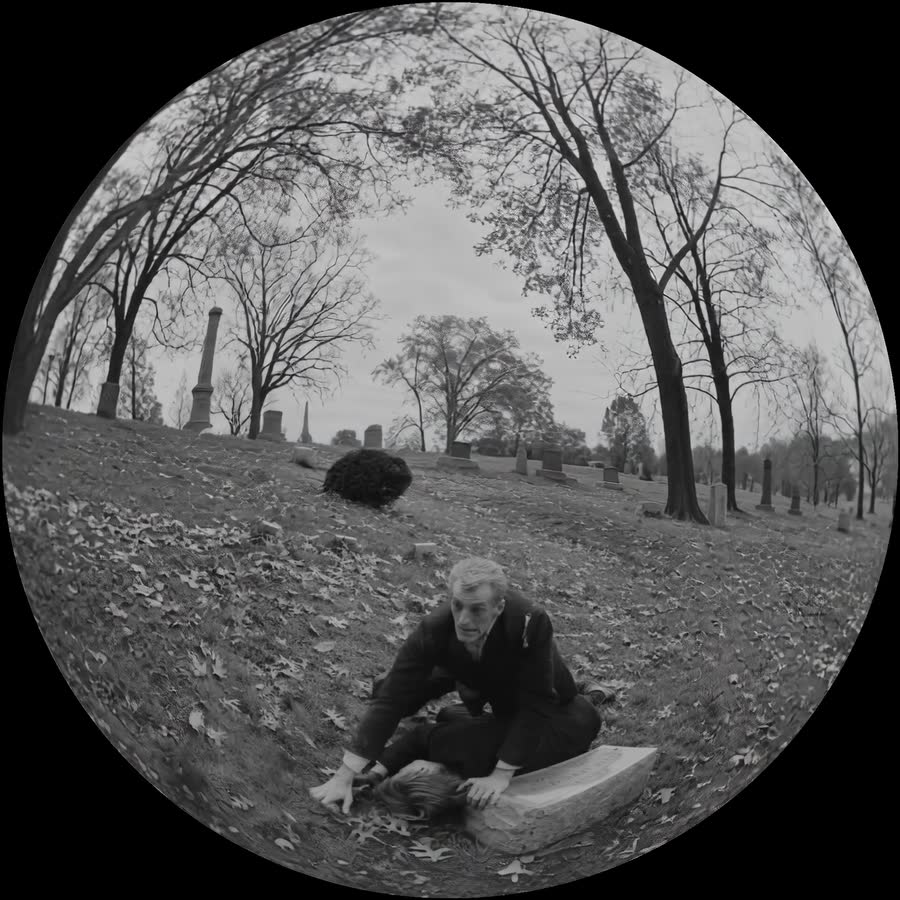 Dome remaster
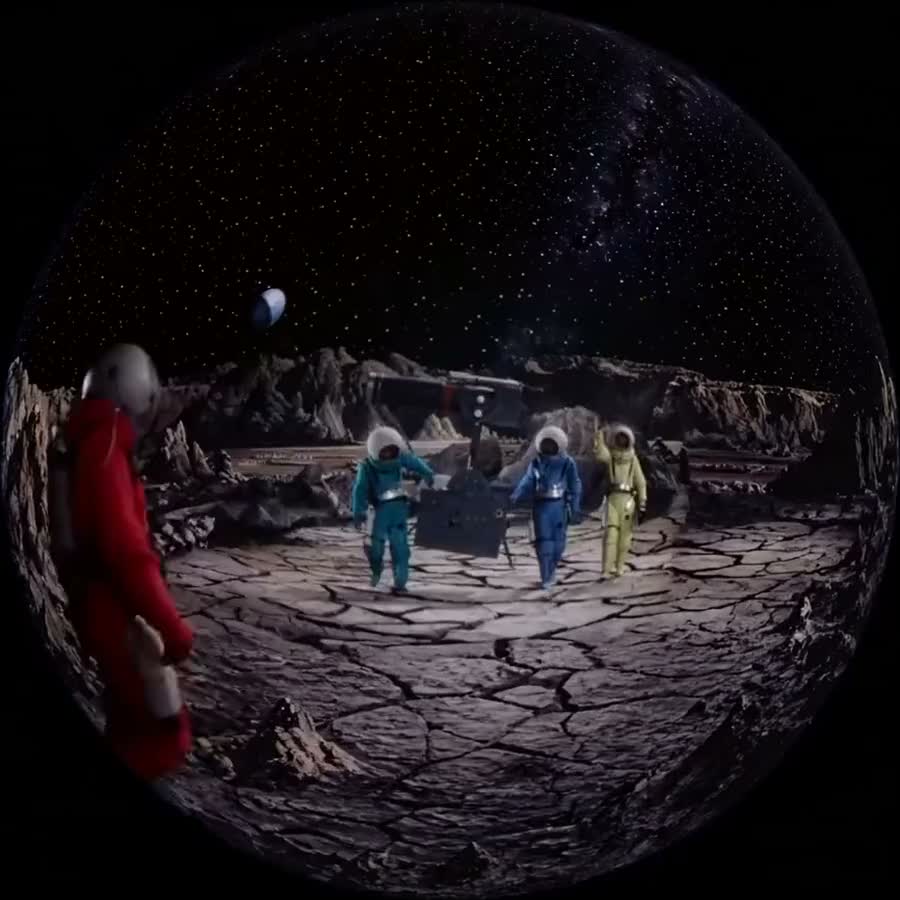 180° fisheye
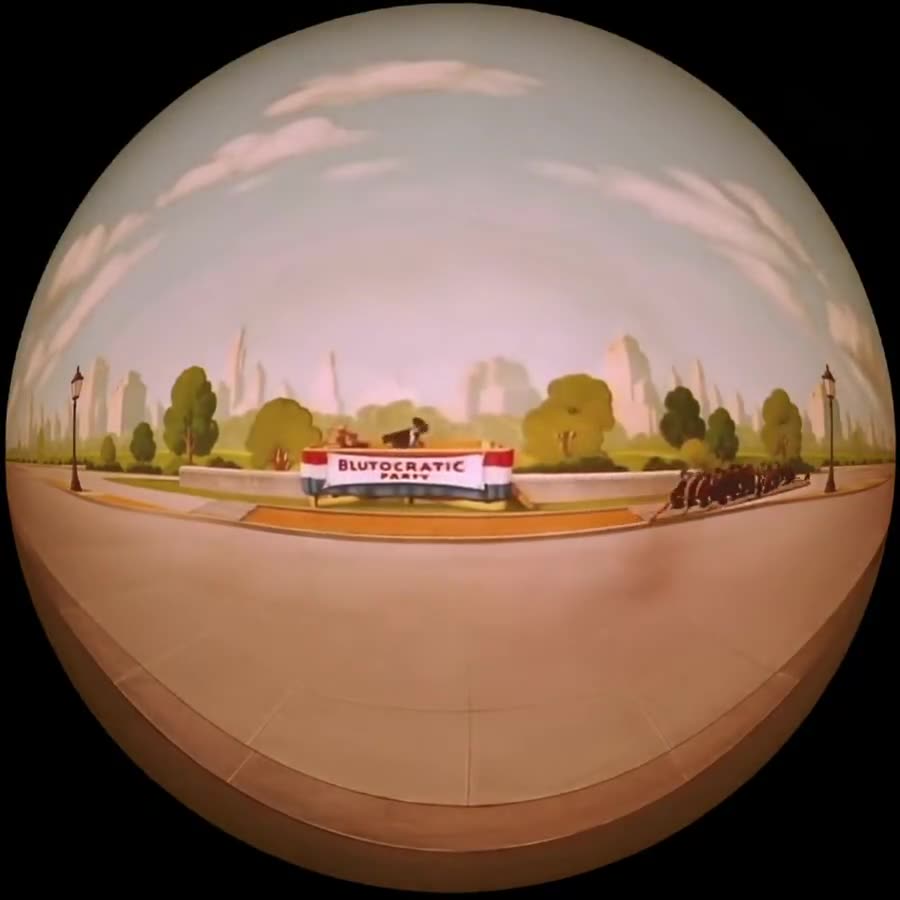 180° fisheye
Already shot in 360 or VR?
360° and VR footage already sees in every direction, but a dome will not play a raw equirectangular or VR180 file. A planetarium expects a circular 180° fisheye master, aimed and calibrated for the dome. Drop a VR file on the dome as-is and the geometry is wrong: straight lines bow, the horizon lands in the wrong place, and the sweet spot sits empty.
Outpaint reprojects and remasters your existing 360 or VR footage into a true dome master. We remap the projection, resolve VR180 stereo down to a single clean dome view, and aim the result at the sweet spot, so immersive footage you already captured finally lands on the dome correctly. Your captured pixels are preserved: we reproject them, we do not repaint them.
And where a capture falls short of the full hemisphere, whether a narrow field of view, masked poles, or stretched edges, we outpaint the gap, generating matching footage to complete the dome instead of leaving black. The same pixel-perfect original, now dome-ready. Send 360° equirectangular, VR180, fisheye, or flat, and get back one 180° fisheye fulldome master.
Built for every dome.
One source clip, expanded into an immersive master for wherever it screens.
Planetariums & science centers
Turn film, archival, or educational footage into 180° fisheye masters that fill the whole planetarium dome.
Immersive, VR & LBE venues
Dome theaters, VR headsets, location-based attractions, and immersive art rooms. A VR headset renders a fisheye view too, so the same 180° dome master drops straight in.
Live events & installations
Concert domes, brand activations, and gallery installations that need footage wrapped overhead, not boxed.
Why it works.
The whole hemisphere
We generate the full 180° dome around your frame, so the scene reaches the horizon instead of floating in a window.
No fisheye rig, no reshoot
Archival, film, or new footage all work. No dome camera, no re-capture, no timeline work on your end.
Original, pixel-perfect
Your source frame stays untouched. We only generate outside it, and the fill blends seamlessly into your footage.
Dome-ready masters
180° fisheye and 360° equirectangular, up to 16K, any FPS and color space, to the specs your dome system expects.
Good to know.
What is fulldome video?
Fulldome video is footage mastered for projection onto a hemispherical dome screen, so the image wraps overhead and fills a viewer’s whole field of view. It is usually delivered as a circular 180° fisheye frame, and it is the standard format for planetariums, science centers, and immersive dome theaters.
Can you turn a normal flat video into a fulldome master?
Yes. Outpaint expands a flat, rectangular clip into a full 180° fisheye dome by generating the entire hemisphere of new footage around your original frame. Instead of cropping your shot into a small window on the dome, the scene extends continuously to the horizon, so the footage feels made for the dome.
Can you convert 360 or VR video into a fulldome master?
Yes. If you already have 360° equirectangular, VR180, or fisheye footage, Outpaint reprojects and remasters it into a dome-ready 180° fisheye master, remapping the projection and aiming it at the dome’s sweet spot. Because your capture already holds the pixels, we reproject them rather than generate them, and where the field of view falls short of the full dome we outpaint the rest. Your original stays pixel-perfect.
What’s the difference between VR or 360 video and fulldome?
They are related but not the same. 360° and VR video are stored in projections built for headsets, usually equirectangular or VR180 stereo, where each viewer looks around freely. Fulldome is mastered as a circular 180° fisheye aimed at a fixed dome and its sweet spot, for a shared reclining audience. Converting one to the other means reprojecting the image and re-aiming it, which is what Outpaint does.
Does the original footage change when you dome it?
No. Every pixel you shot stays exactly where it was, pixel-perfect. Outpaint only generates the area outside your original frame to fill the rest of the dome, and the generated surround blends seamlessly into your footage.
What resolution and format do you deliver fulldome masters in?
Outpaint delivers 180° fisheye dome masters and 360° equirectangular, up to 16K resolution, at any frame rate and color space, matching the fisheye-square specs planetarium and dome playback systems expect.
Who uses fulldome video?
Planetariums and science centers, immersive dome theaters and location-based entertainment venues, live events and concert domes, and immersive art installations. Any archival, film, or new footage can be expanded into a dome master without a reshoot.
Do you train on my footage?
No. We never use your footage to train AI models, and we do not share it. Your video is used only to produce your deliverable and stays private, and you keep full ownership of what you send and what you get back.
How much does a fulldome master cost?
We charge per second of video. The rate scales with resolution, frame rate, target aspect ratio, and other specs, so it varies from clip to clip. Send us your footage and the format you need, and we will quote it.
How do I get a video converted to fulldome?
Send Outpaint your clip and tell us it is for a dome. You get back a finished 180° fisheye fulldome master, done for you, with no plugins or timeline work on your end. Book a short call to start.
Have footage that belongs on a dome?
Book a 15-minute intro call and we’ll show you how the process works, answer your questions, and expand a sample clip into a fulldome master for you.